
Switching to Compliance Pro
Switch from paper or any software, with a compliance check of every file.
We bring your client and staff records into Compliance Pro, sort every page, and show you exactly what’s missing or needs redoing before your next review.
- Personal care and home care
- 245D
- ARMHS
Three ways to switch
The hardest part of switching is the old files. That’s the part we take on.
Pick one way for everything, or a different way for different records.
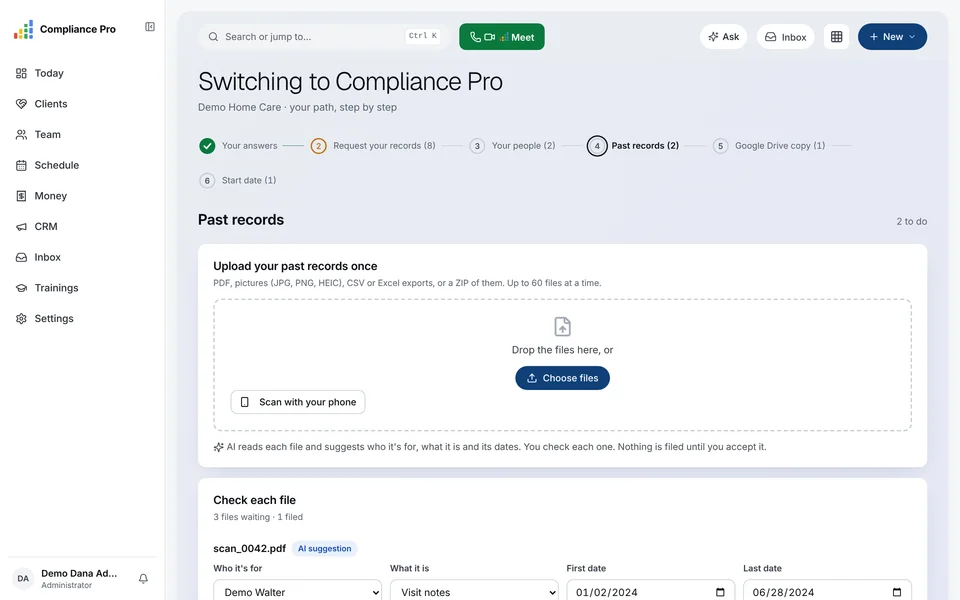
Upload it yourself
Scan your paper or export from your current system, and upload it. AI sorts it and we check every file.
We do it for you
We collect your paper and exports, scan them and sort them. Every box is logged from pickup to return.
Keep your records where they are
Check off what you have on file, with its dates and where it’s kept. Reminders take over from there.
How it works
Four steps, from boxes to a checked file
Bring everything in
Paper scans, PDFs, zip folders or exports from another system. Many people’s files in one scan is fine.
AI sorts every page
Each page goes to the right client or caregiver folder. Anything AI isn’t sure about goes to a person.
Gaps are flagged
Missing pages and missing documents are listed for each person.
Every file is checked
Red: missing or expired. Amber: there, but it doesn’t meet the standard, with the reason in plain words and the rule behind it. Green: OK. “Redo with the Compliance Pro form” pre-fills the new form from the old one, and the original stays on file.
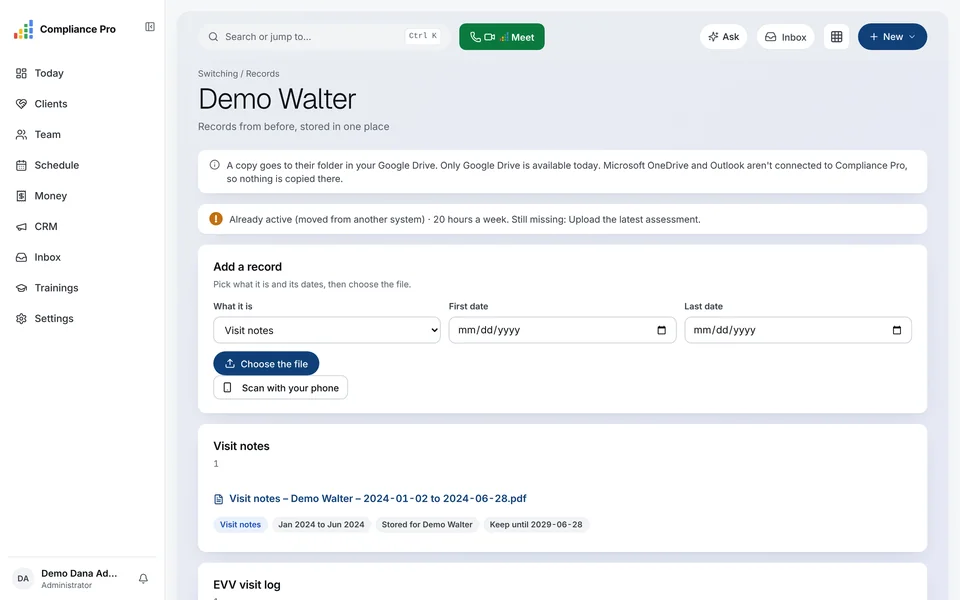
Drawn screens, with demo data. Every name is made up.
The agency report
Where you stand, service by service
When every file is checked, you get one report for the agency.
- A score for each service
- The top issues across your files
- A fix-it plan, by person and by document
- A PDF summary for the owner
Your files then live in record folders, organized the way a licensing review expects.
Have it on file
Keep records where they are
Not ready to move everything? For each document, record:
- The document’s date and the period it covers
- The next due date
- Where it’s kept: a binder, a cabinet or another system
- Reminders before it’s due, so the next version is done in Compliance Pro
Pricing
One time, on top of implementation
For any service and any state we serve. Staff files are included.
Already have it on paper
Included with setup
Confirm what you keep on file, with its dates and where it’s kept. No upload.
Self-upload
$995 for up to 25 clients
then $20 per extra client
You upload your files. AI sorts them, finds what’s missing and checks them against your state’s rules, and you get an agency report.
Half credited back when you pay yearly.
Done for you
$2,500 for up to 25 clients
then $40 per extra client
We collect, scan and sort your paper and exports, then check every file and give you the agency report.
- One time, on top of implementation.
- Includes up to 200 pages per client.
- Staff files are included.
Your records, protected
Safe from the first box to the last check
BAA first
A signed Business Associate Agreement is in place before anything is uploaded.
Encrypted storage
Uploads and scans are stored encrypted, and every view is in your audit log.
Chain of custody for paper
Each box is logged when it’s picked up, scanned and returned, and both sides sign.
Your originals, your choice
Paper originals are returned to you, or kept as you choose.
A person reviews AI
Every AI result is a suggestion a person on our team or yours reviews.
Guidance, not legal advice
Audit notes point to the rule they’re based on. They are guidance, not legal advice.
Questions about switching
How long does it take?
It depends on how many files you have and how you switch. We agree a plan and a go-live date with you at the start, and you can see progress as pages are sorted and checked.
What if we use another EVV system?
Compliance Pro has built-in EVV for every state, with GPS clock-in and visit verification. Export what you have from your current system and we bring it in with the rest of your records. In another state, ask us where its EVV connection stands first.
Do we have to upload everything?
No. You can keep records where they are and check them off instead: the date, the period covered, the next due date and where each is kept. Reminders take over from there.
What happens to our paper originals?
They are returned to you, or kept as you choose. Every box is logged from pickup to return.
Is this included for all services and states?
Yes. It works for personal care and home care, 245D (basic and intensive, including ICS) and ARMHS, in every state we serve. Each file is checked against the rules for its service and state.
How accurate is the AI?
AI suggests where each page goes and reads dates and signatures. Anything it isn’t sure about goes to a person, and nothing is filed until a person confirms it.