Built for HIPAA, BAA includedBuilt-in EVV

Certified Signature

Every signature comes with its own proof

The Compliance Pro Certified stamp, a verification code and a Certificate of Completion on every signed document, so you can show who signed what, when and how.

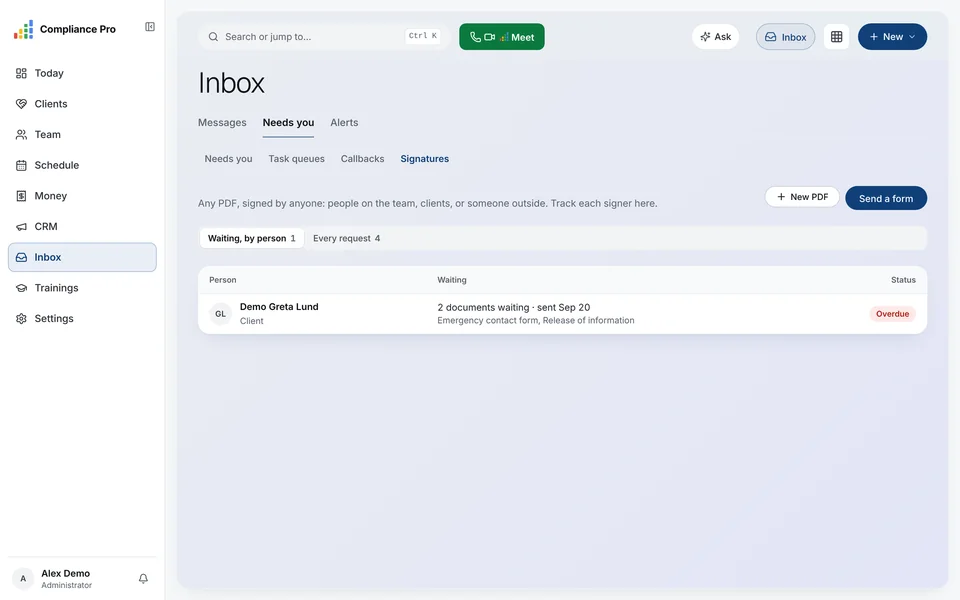
Inbox › Needs you › Signatures in the office web app: any PDF signed by anyone, with who is waiting, what was sent and its status, New PDF and Send a form. Demo data.
Laptop · A signed packet with the certified stamp
5parts of proof on signed packets and envelopes
SHA-256integrity fingerprint
30 daysbefore a signed-copy link expires
0versions overwritten: earlier ones are kept

Anatomy of a certified signature

What each part shows

1

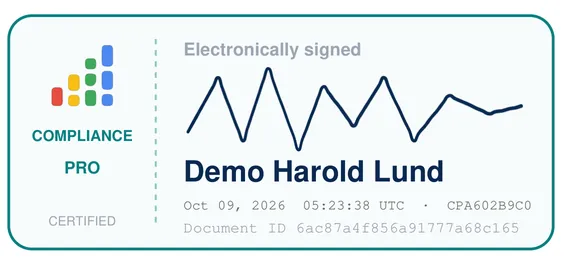
The Compliance Pro Certified stamp

  • The Compliance Pro seal and the word “Certified”.
  • “Electronically signed”, then the person’s drawn signature.
  • Their name, and the date and time with the time zone.
  • A verification code that ties the stamp to the signing event in the app.
  • The document ID.
The Compliance Pro Certified signature stamp: the seal, the drawn signature, the signer’s name, the date and time, and the verification code. Demo data.

Screenshot from the app, demo data.

2

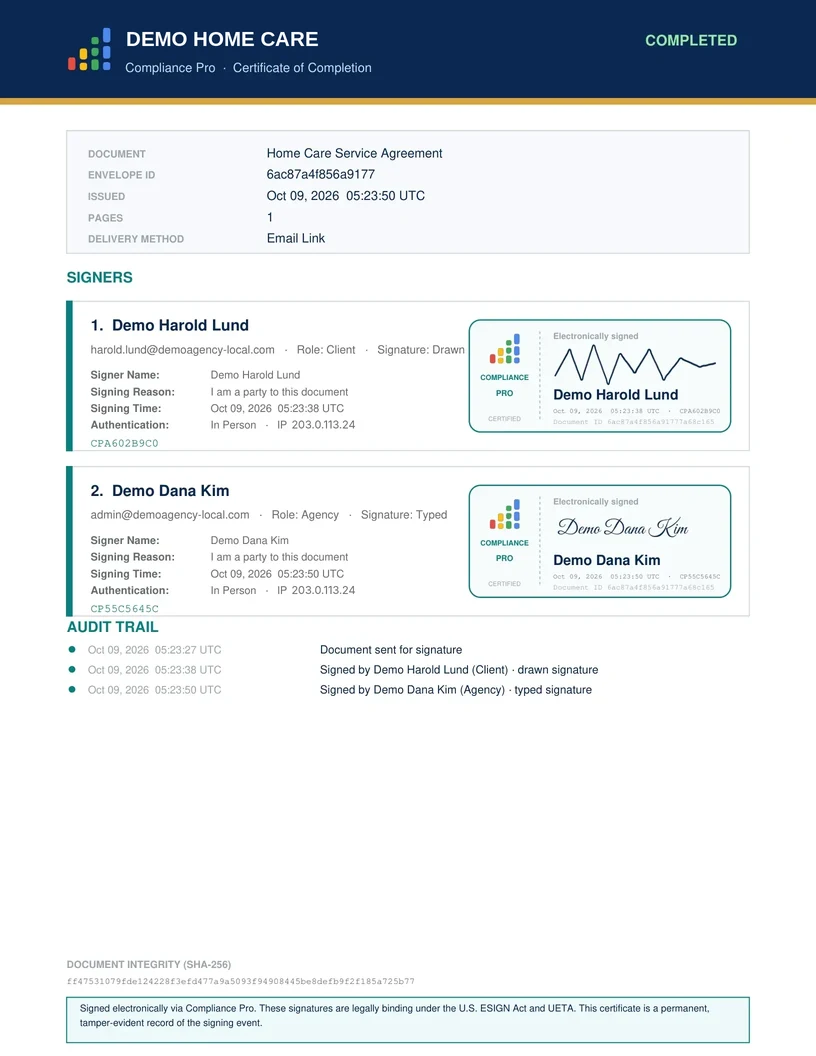
The Certificate of Completion

  • Added as the last page of signed packets and envelopes, with your agency’s name.
  • A summary: the document, envelope ID, date issued, page count and delivery method.
  • One card per signer: name, email, role, signing reason, signing time, how they were reached and from which IP address, their verification code and their signature.
A Certificate of Completion for a signed document: the agency, each signer’s details and certified stamp, the audit trail and the integrity hash. Demo data.

Screenshot from the app, demo data.

3

The SHA-256 integrity hash

  • A SHA-256 fingerprint of the signed document, taken before the certificate page is added.
  • If anyone changes the document afterwards, its fingerprint no longer matches the one on the certificate.
  • Exports list the fingerprint of every file.
The document integrity line of a signed document: its SHA-256 fingerprint. Demo data.

Screenshot from the app, demo data.
4

The audit trail

  • When the document was sent for signature.
  • When each person signed it, and in what role.
  • Every view and download in the app is also recorded in the agency’s audit log.
The audit trail of a signed document: when it was sent, viewed and signed, by whom. Demo data.

Screenshot from the app, demo data.

5

The signed-copy code page

  • Signed copies are sent as a link; no PDF is attached to the email.
  • The link opens only with the signer’s own verification code, which isn’t in the email.
  • Links expire after 30 days and lock after 10 wrong codes. The signer can ask for a new one.

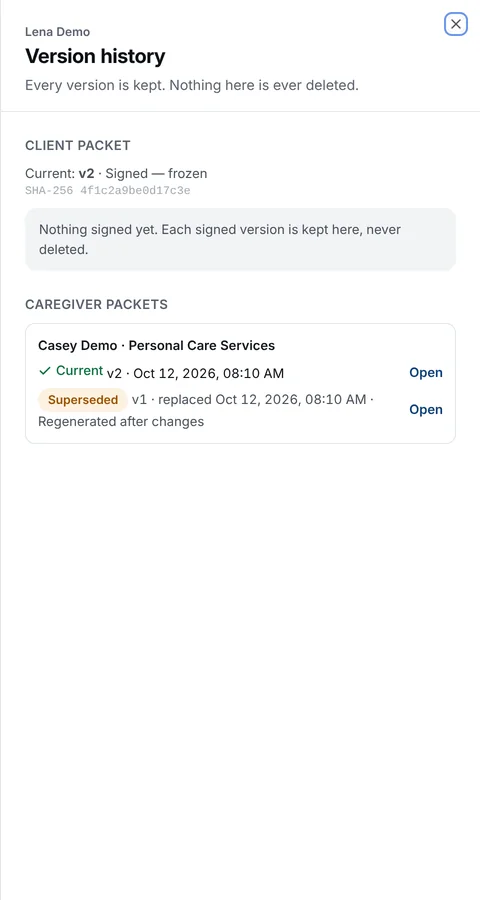
Version history

Nothing is overwritten

When a signed document needs to be redone, the old one is voided, not deleted. Each version keeps the reason it was replaced, who replaced it and when.

Version history of a client’s signed packets in the office web app: every version is kept and nothing is deleted, the current signed client packet and the caregiver packets with the version it replaced. Demo data.

Screenshot from the app, demo data.

Signing

Wherever the person is

  • Through a link on a phone or computer, without a password.
  • In person on the office’s device.
  • Any PDF up to 25 MB, to staff or outside people, with an optional signing order.
  • Reminders to anyone who hasn’t signed.
  • Completed PDFs filed into your Google Drive, if you connect it.

Built around the requirements of the federal ESIGN Act (15 U.S.C. § 7001)and the Uniform Electronic Transactions Act (UETA) as adopted by the states. Signers agree to sign electronically when they click Sign.

Acceptance of electronic signatures for specific state forms is determined by each state agency. No state agency has approved or endorsed Compliance Pro.

See a signed document from start to finish