Built for HIPAA, BAA includedBuilt-in EVV

Features

Documents and e-signature

Your forms as signable packets, and any PDF sent for signature in a few clicks.

The Compliance Pro Certified signature

Compliance ProCertified
Electronically signed Riley Morgan Oct 9, 2026 · 10:41 AM CDTCP2E7C4B90 Document ID 4c27e9a1b65d

On every signature, with the signer’s name, the time and a code that opens the signed copy.

Who uses it

Office staff, Caregivers, Clients and families, People outside the app

The rule

ESIGN Act and UETA

Read the rule →

Included in

Every service, at one price

See pricing →

The problem it solves

Paper packets get lost, and a signature nobody can prove is a finding.

Intake agreements, care plans and personnel forms need signatures from clients, caregivers and the office, often in that order. Printing, scanning and chasing them takes days, and when a reviewer asks who signed and when, a scanned page doesn’t answer.

  • Your forms set up as packets for each person
  • Sign by a secure link or in person
  • A certified stamp and Certificate of Completion on every signed copy

How it works

Documents and e-signature, step by step

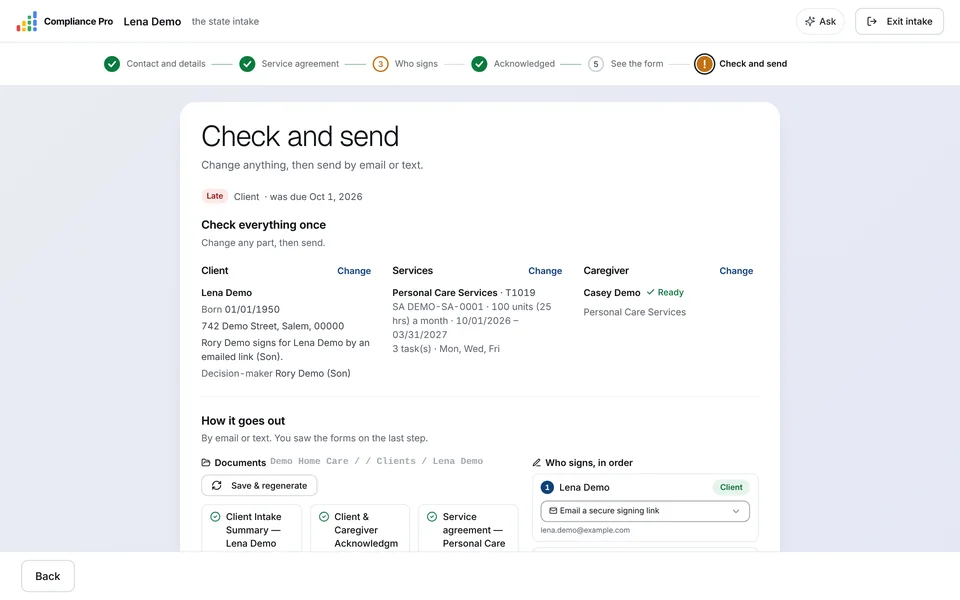
Check and send, the last step of a client’s paperwork in the office web app: the client, services and caregiver to check once, then the documents and who signs them, in order. Demo data.

Screenshot from the app, demo data.

Your forms, as packetsWe set up your agency’s forms as signable packets for clients, caregivers and nurses. Each packet shows what’s signed and what’s still waiting. Office staff

In the app

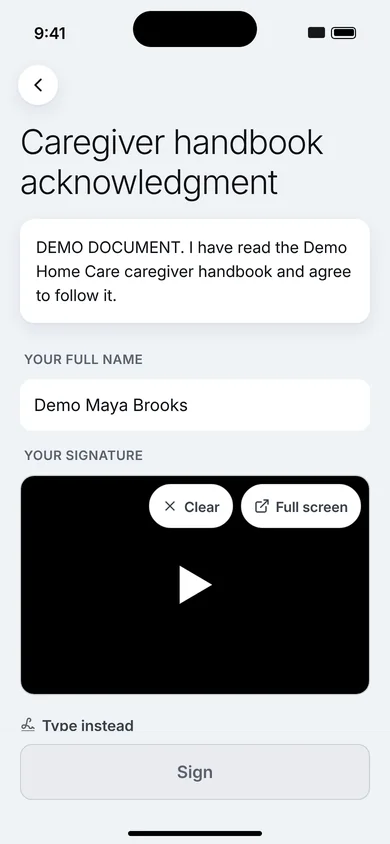
Caregiver app, signing a document: the caregiver handbook acknowledgment, her full name, her signature drawn with a finger, and Sign. Demo data.

In person

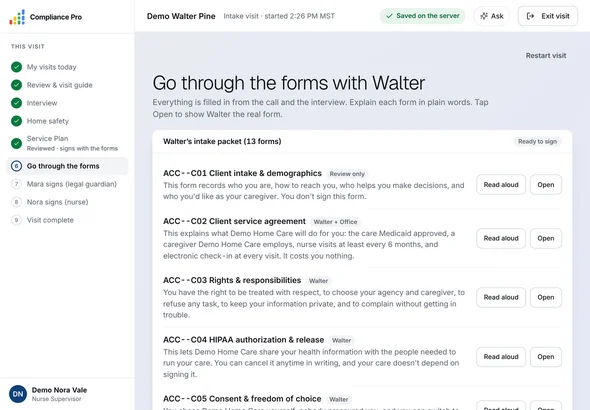
Going through the forms with the client on the nurse’s iPad: each form in the intake packet explained in plain words, with Read aloud and Open. Demo data.

Screenshot from the app, demo data.

Sign anywhereSigners open a secure link on any device, with no password, or sign in person on the office’s iPad. Caregivers sign inside the app. Caregivers and staff
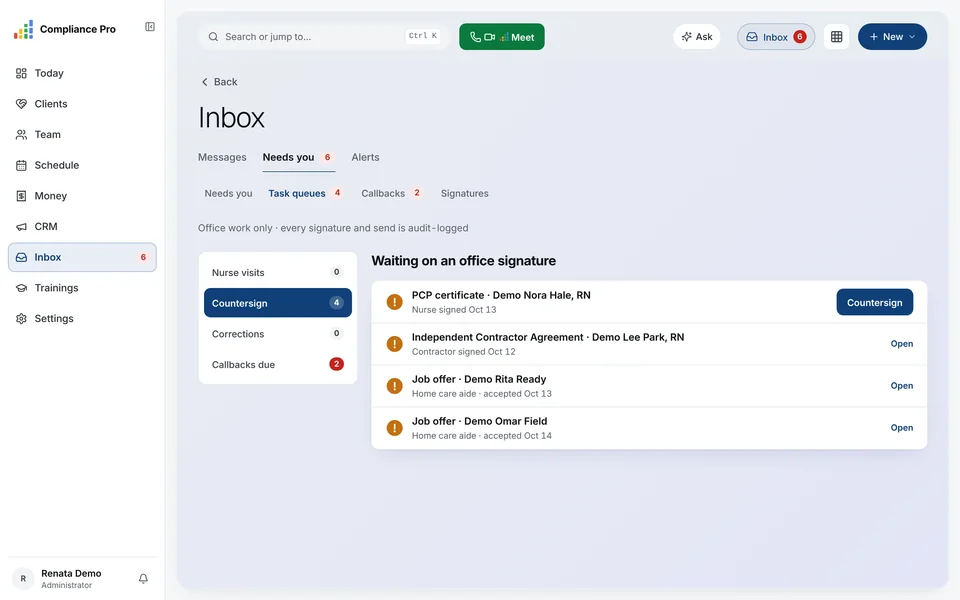
Inbox › Needs you › Task queues in the office web app: the countersign queue with the documents waiting on an office signature, such as a nurse’s certificate, a contractor agreement and job offers, each with Countersign or Open. Demo data.

Screenshot from the app, demo data.

The office countersignsForms that need the agency’s signature wait in the countersign queue, and are signed straight from the list. Office staff
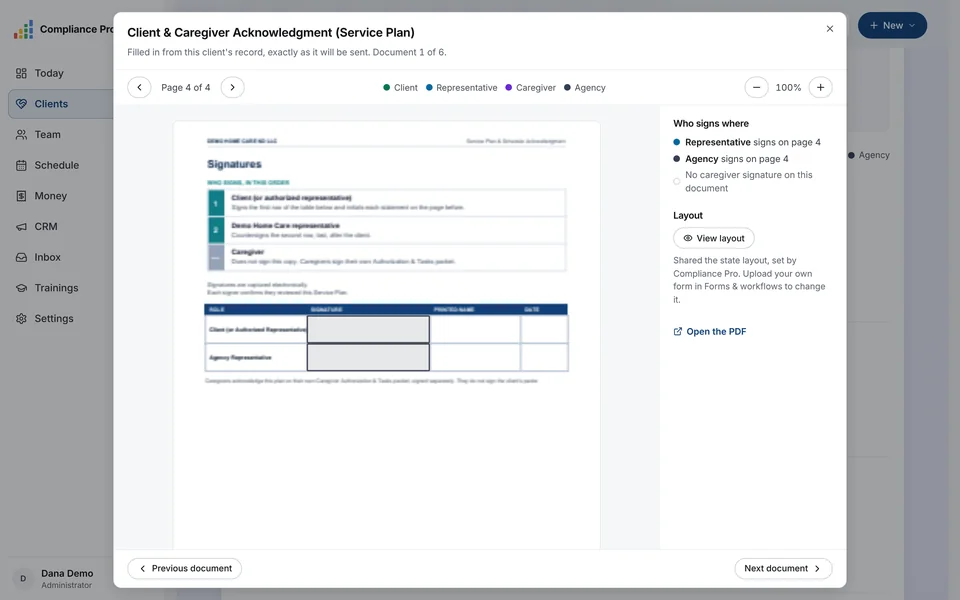
A client’s signed document opened in the office web app: the signatures page, who signs where, and the layout, with the previous and next document. Demo data.

Screenshot from the app, demo data.

Certified, with a Certificate of CompletionEvery signature carries the Compliance Pro Certified stamp, and the signed copy gets a Certificate of Completion with each signer, the time and the audit trail.
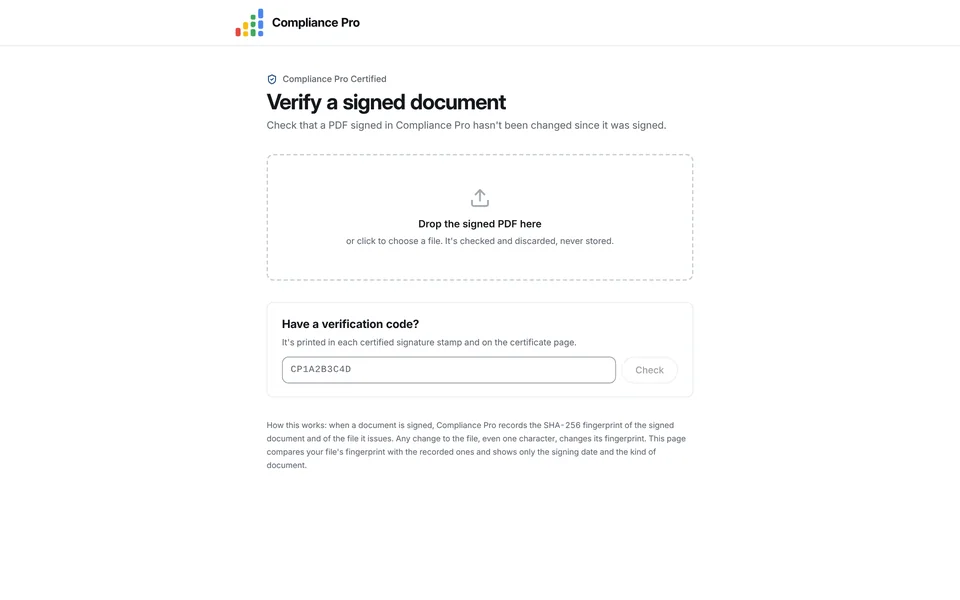
The public Verify page: drop a PDF signed in Compliance Pro to check it has not been changed since it was signed. Demo data.

Screenshot from the app, demo data.

Anyone can check it laterDrop a signed PDF on the verify page, or type its code, to see that it matches the original exactly.

Screens from the Compliance Pro app, with demo data. Every name is made up.

Signed documents

Every signature on its own line, certified

Three sample documents with demo data. Each signer’s Compliance Pro Certified stamp sits on the line where they sign, with their name, the date and time, and a verification code.

Demo Home CareDemo agency
ARMHS
Sample · demo data

Individual Treatment Plan (ITP)

Adult rehabilitative mental health services

ClientAvery Chen
Client IDNW-1042
Plan dateOct 9, 2026
Next reviewApr 7, 2027
Mental health practitionerJordan Reed
Clinical supervisorMorgan Ellis, LICSW

Goals and objectives

Goal 1: Live on my own budgetObjective 1.1: Plan weekly meals and a shopping list within budget, 4 of 4 weeks.
Goal 2: Keep my appointmentsObjective 2.1: Use a phone calendar to attend scheduled appointments, 90% of the time.

Services

ServiceHow oftenStaff
Basic living and social skills2 sessions a weekJordan Reed
Community intervention1 session a weekJordan Reed
Medication educationMonthlyMorgan Ellis
Compliance ProCertified
Electronically signed Avery Chen Oct 9, 2026 · 2:14 PM CDTCP4F81A2C7
ClientAvery Chen
Compliance ProCertified
Electronically signed Morgan Ellis Oct 9, 2026 · 4:02 PM CDTCP9B03D5E1
Clinical supervisorMorgan Ellis
Document ID b81f3c09e4a2Page 1 of 1
  • Real fieldsThe document’s own headings and fields, filled from the record.
  • Signed where it belongsEach signer signs on their own line, in the order you set.
  • Certified stampName, date, time, time zone and a verification code that opens the signed copy.
  • Locked when doneEvery version is kept. A change means a new version, never an overwrite.

Send any PDF

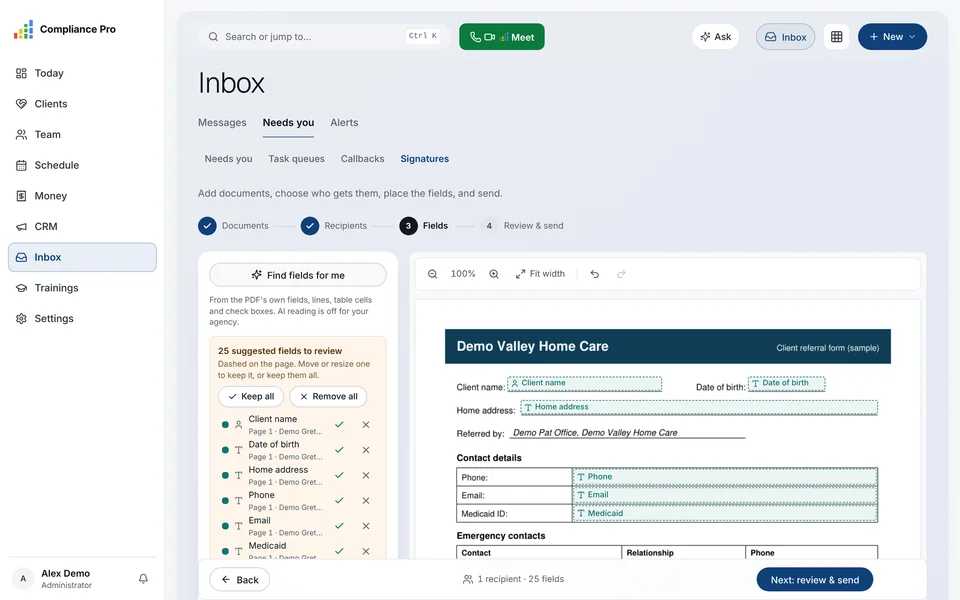
Drag the fields on. Pick who signs.

Upload a PDF, drag signature, initials, date, text and checkbox fields onto the page, and give each one to a signer. Save it as a template to use again.

Send for signature in the office web app: place signature, initials, date, text and checkbox fields on the PDF and give each to a signer. Demo data.
  • Five kinds of fieldSignature, initials, date signed, text and checkbox.
  • A colour per signerClients, staff, supervisors or people outside the app.
  • Signing orderThe next person is asked only when the one before has signed.
  • TemplatesPlace the fields once, reuse them for every client.

Sign anywhere

On their phone, or in person on an iPad

Clients and staff sign by a secure link with their finger. At a visit, the nurse reads the form aloud and hands over the iPad.

Caregiver app, signing a document: the caregiver handbook acknowledgment, her full name, her signature drawn with a finger, and Sign. Demo data.
In the staff appStaff sign forms in the Compliance Pro app with a finger. Clients sign by a secure link, no account needed.
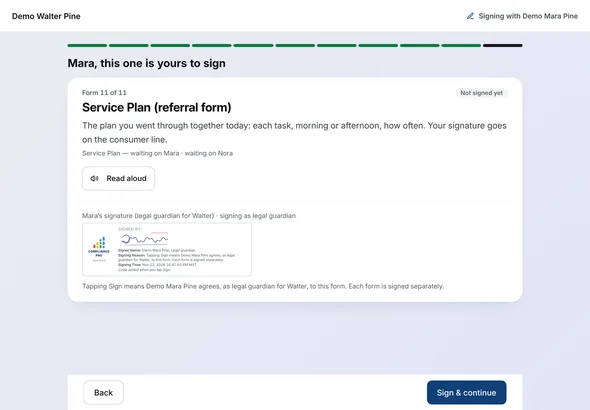
Signing on the nurse’s iPad during the visit: the client’s legal guardian signs the service plan, with the plain-language summary, Read aloud and her certified signature. Demo data.
In person, on the iPadRead aloud in plain words, then signed on the nurse’s iPad at the visit.

Certificate of Completion

The proof, on the last page

Every signed packet and envelope ends with a Certificate of Completion: who signed, when, how, each signer’s certified stamp, the audit trail and a SHA-256 fingerprint of the signed document.

  • Each signer with their stamp and verification code
  • Sent, viewed and signed, with times and time zones
  • A fingerprint that changes if one character of the document changes
How the certified signature works

Try it

Sign a demo document

Fill in three fields, sign with your finger or mouse (or type your name), and see the certified stamp and Certificate of Completion the app adds. It all happens on this page: nothing is sent or saved.

Demo — not a real signature, nothing is saved.

Demo Home Care

Demo acknowledgement

I have read the Demo Home Care demo policy and agree to sign electronically.

Signature
Takes the date, time and time zone from your device when you tap Submit.

Who uses it

Each person sees their part

  • Office staff

    Send packets and any PDF, remind signers and countersign.

  • Caregivers

    Sign onboarding forms and policies in the app.

  • Clients and families

    Sign agreements by a secure link or in person.

  • People outside the app

    Sign with just a name and email, no password.

The rule it helps you meet

Electronic signatures that hold up

Under the ESIGN Act and UETA, an electronic signature can’t be denied legal effect just because it’s electronic, when the signer agrees to sign electronically and the record is kept. Compliance Pro records consent, who signed, when and how, and keeps every version. Whether a specific state form may be signed electronically is up to the agency that owns it.

Compliance Pro is software. Your agency stays responsible for meeting the rules, and your state’s own rules apply.

Everything it does

Documents and e-signature, in detail

  • Your agency’s forms set up as packets for caregivers, nurses and clients.
  • Send any PDF up to 25 MB for signature, to staff or to people outside the app, with an optional signing order.
  • Sign by a secure link, or in person on the office’s device.
  • Every signature carries the Compliance Pro Certified stamp, and signed packets and envelopes get a Certificate of Completion.
  • Reminders to anyone who hasn’t signed yet, all at once or one person at a time.
  • Earlier versions are kept with the reason they were replaced. Nothing is overwritten.
  • People outside the app sign with just a name and email, no password.
  • Coordinators see only the envelopes they sent; admins see all of them.
  • Signed copies go out as a secure link that opens only with the signer’s own code.
  • Download any signed PDF with its Certificate of Completion attached.
  • Completed PDFs filed into your Google Drive folders, if you connect it.

Questions

Do signers need an account?

No. They sign through a secure link without a password.

What happens if a signed form has a mistake?

Reset it. The old version is voided and kept with the reason, and the person signs the corrected one.

Are these signatures legally valid?

Certified Signature is built around ESIGN Act and UETA requirements. Whether a specific state form may be signed electronically is up to the state agency that owns it.

Ready to run compliance without the paperwork?