
Built for HIPAA, BAA includedBuilt-in EVV

Features

Office task queues

Countersignatures, corrections and callbacks in one list instead of five inboxes.
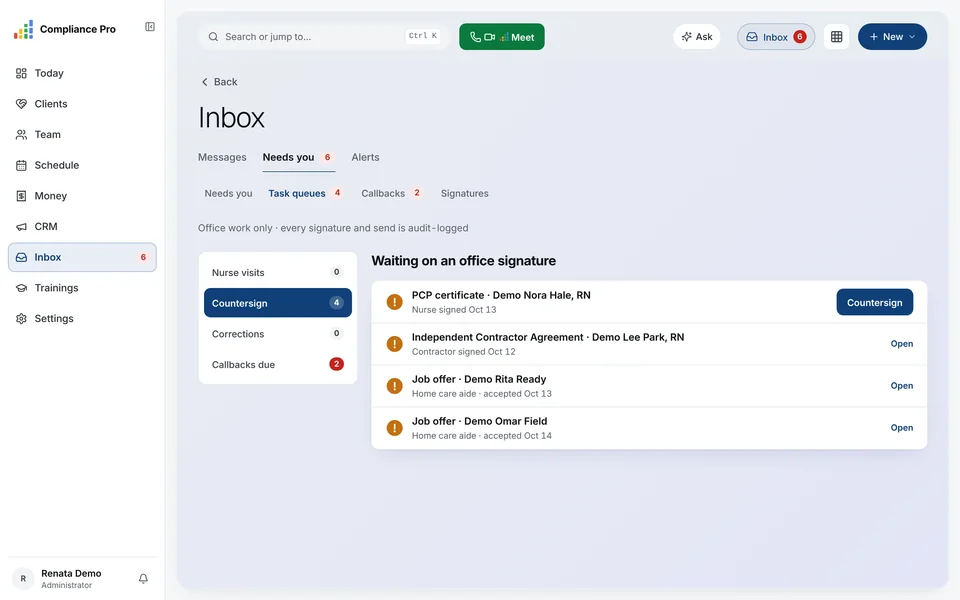
Inbox › Needs you › Task queues in the office web app: the countersign queue with the documents waiting on an office signature, such as a nurse’s certificate, a contractor agreement and job offers, each with Countersign or Open. Demo data.

Screenshot from the app, demo data.

Who uses it

Office staff, Admins

The rule

HIPAA audit controls

Read the rule →

Included in

Every service, at one price

See pricing →

The problem it solves

Office work hides in five inboxes.

Countersignatures, corrections from nurse visits and callbacks each live somewhere different, so things wait unseen until a reviewer finds them.

How it works

Office task queues, step by step

Inbox › Needs you › Task queues in the office web app: the countersign queue with the documents waiting on an office signature, such as a nurse’s certificate, a contractor agreement and job offers, each with Countersign or Open. Demo data.

Screenshot from the app, demo data.

Corrections, approved or dismissedThe old value sits next to the new one, and nothing changes on the record until someone approves it. Office staff
Inbox › Needs you › Task queues in the office web app: the countersign queue with the documents waiting on an office signature, such as a nurse’s certificate, a contractor agreement and job offers, each with Countersign or Open. Demo data.

Screenshot from the app, demo data.

Countersign from the listForms waiting on the agency’s signature are signed straight from the queue. Office staff
Inbox › Needs you › Task queues in the office web app: the countersign queue with the documents waiting on an office signature, such as a nurse’s certificate, a contractor agreement and job offers, each with Countersign or Open. Demo data.

Screenshot from the app, demo data.

Callbacks dueFamilies to call back today, with attempts and notes. Office staff

Screens from the Compliance Pro app, with demo data. Every name is made up.

Who uses it

Each person sees their part

  • Office staff

    Work each queue and clear it.

  • Admins

    See counts on the menu so nothing waits unseen.

The rule it helps you meet

Every signature and change, logged

Every signature and send from a queue is written to the audit log, with the person and the time.

Compliance Pro is software. Your agency stays responsible for meeting the rules, and your state’s own rules apply.

Everything it does

Office task queues, in detail

  • Queues for countersign, corrections, callbacks due and after-visit work.
  • Corrections show the old value next to the new one, and nothing changes on the record until someone approves it.
  • Every signature and send from a queue is written to the audit log.
  • Counts on the menu so nothing waits unseen.
  • Countersign straight from the list.
  • Dismiss a correction that doesn’t apply.

Questions

Who sees the queues?

Office roles. Queues are office work only.

Ready to run compliance without the paperwork?