
Features
Reports
The lists your office and reviewers ask for, ready to download.
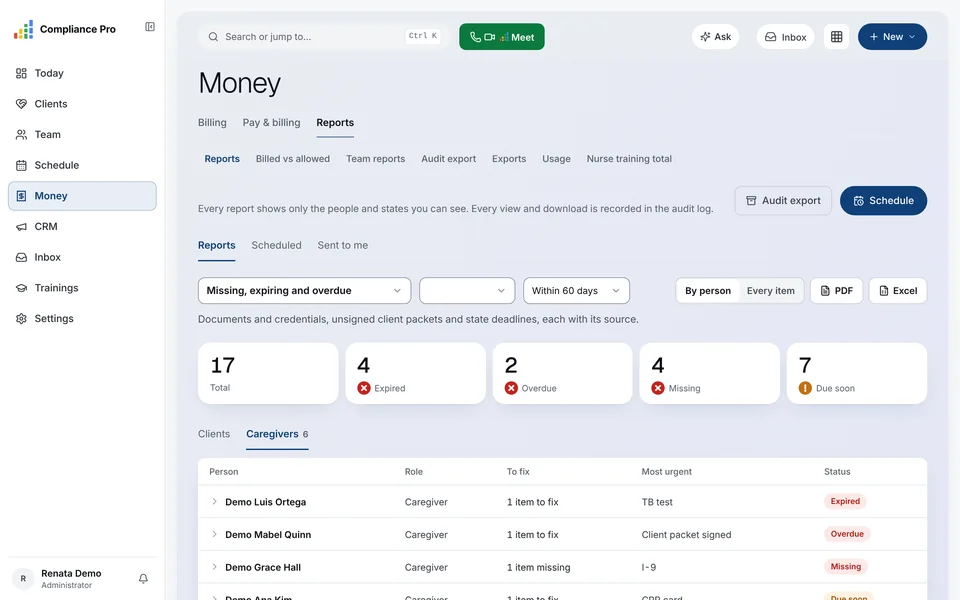
Screenshot from the app, demo data.
Who uses it
Office staff, Owners, Admins
The problem it solves
A reviewer asks for a list, and it takes a week to build.
Who is missing a credential, which state forms are overdue, which packets aren’t signed: the answers exist, but in a dozen places.
How it works
Reports, step by step
Screenshot from the app, demo data.
Each row shows its source
Every requirement shows where it comes from, so you can answer “why is this due?”.
Download or schedule
Download as PDF or Excel, or get it by email weekly or monthly with counts and a link.
Screens from the Compliance Pro app, with demo data. Every name is made up.
Who uses it
Each person sees their part
Office staff
Run the lists they work from each week.
Owners
Get scheduled report emails with the counts.
Admins
Answer a reviewer in minutes.
The rule it helps you meet
Every view and download, logged
Each role sees only the reports it’s allowed to run, and every view and download is written to the audit log.
Compliance Pro is software. Your agency stays responsible for meeting the rules, and your state’s own rules apply.
Everything it does
Reports, in detail
- Six standard reports: missing, expiring and overdue items; staff credentials; overdue state forms; waiting for signatures; intake pipeline; authorized services.
- View on screen, or download as PDF or Excel.
- Each role sees only the reports it’s allowed to run.
- Every view and download is recorded in the audit log.
- Scheduled report emails, weekly or monthly, with counts and a link.
- Each row shows where the requirement comes from.
- Filter by state, person and time window (for example within 60 days).
Questions
Who can run reports?
Each role sees only the reports it’s allowed to run, and every view and download is logged.