
Features
Care alerts
Spots changes in a client early, so your nurse can check in sooner.
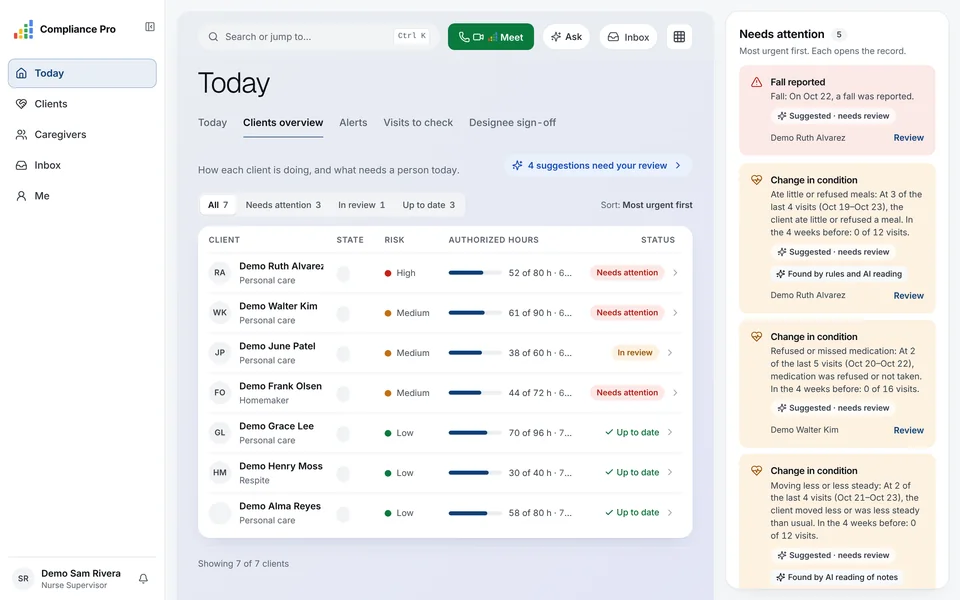
Screenshot from the app, demo data.
Who uses it
Caregivers, Nurses, Coordinators, Admins
The problem it solves
The signs are usually in the notes. Nobody has time to read them all.
A client who starts skipping lunch, refusing a pill or needing two tries to stand up rarely calls the office. Caregivers write it down, visit after visit, in their own words. By the time someone reads the pattern, it has turned into a fall, a hospital stay or an angry family.
- Every visit is checked, not just the ones someone flags
- Each client is compared with their own usual, so you hear what is new
- The alert shows the caregiver’s exact words and the date
How it works
From a visit note to a nurse’s call, the same day
Caregivers don’t do anything extra. Care alerts read what they already record: visit notes, the care tasks they tick off (done, refused or not done), incident and change-of-condition reports, and missed visits.
Clients overview
Screenshot from the app, demo data.
The alert
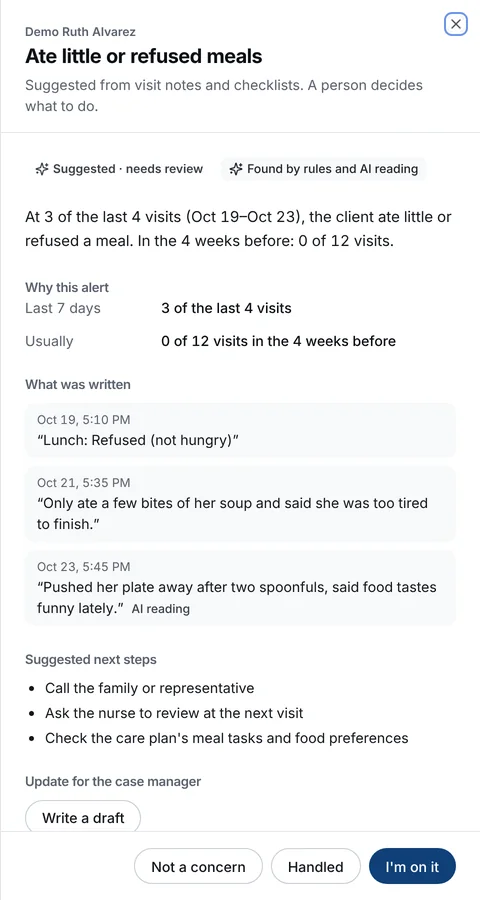
Screenshot from the app, demo data.
Found by AI reading
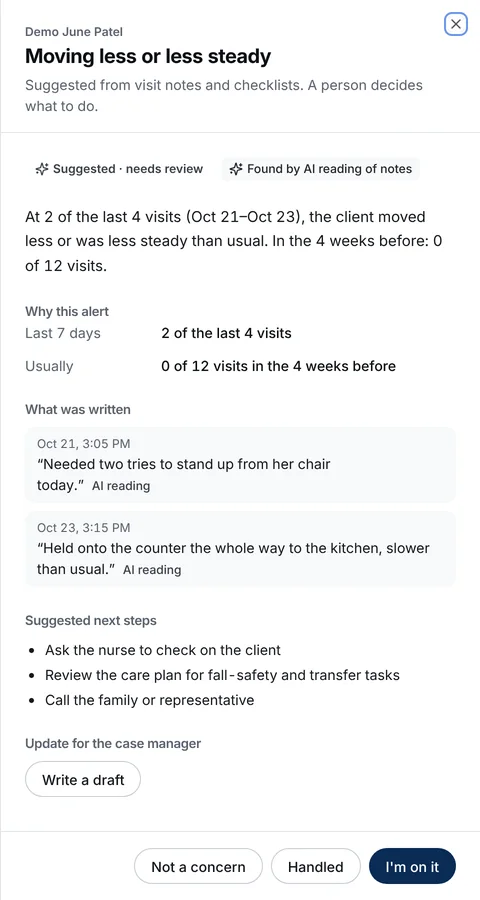
Screenshot from the app, demo data.
Case manager draft
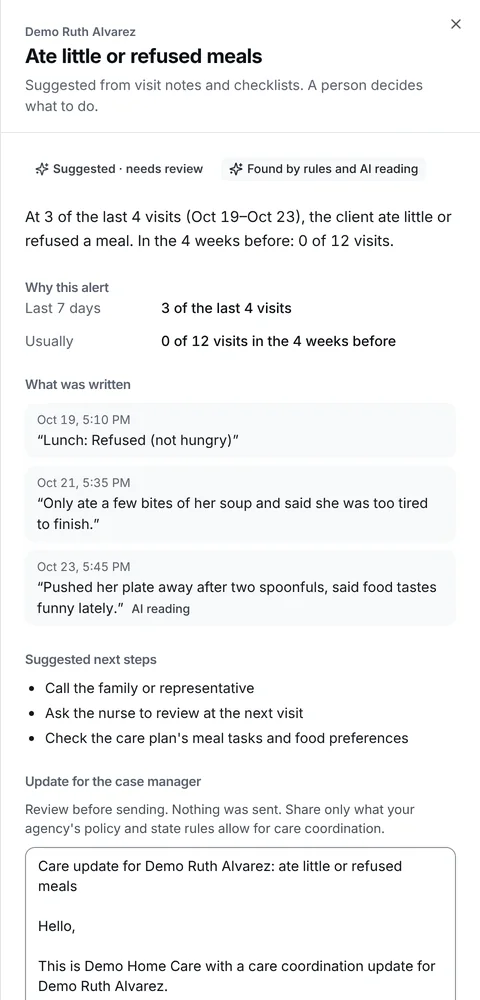
Screenshot from the app, demo data.
Screens from the Compliance Pro app, with demo data. Every name is made up.
On the go
Works on the nurse’s phone too
The same alerts, most urgent first, on any phone browser. Open one, read the evidence, and tap I’m on it from the car.
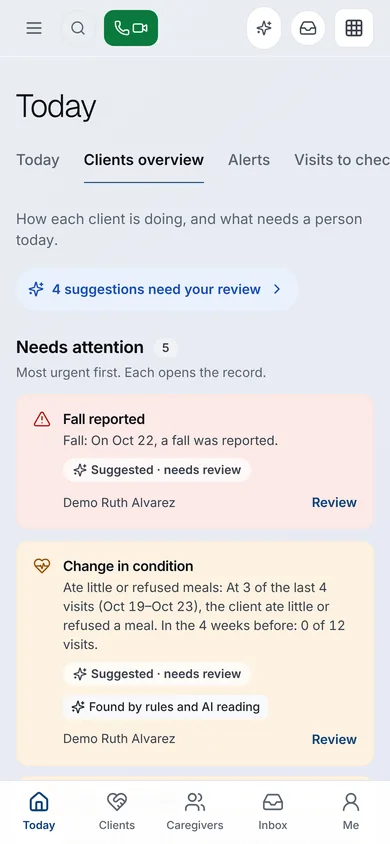
Screenshot from the app, demo data.
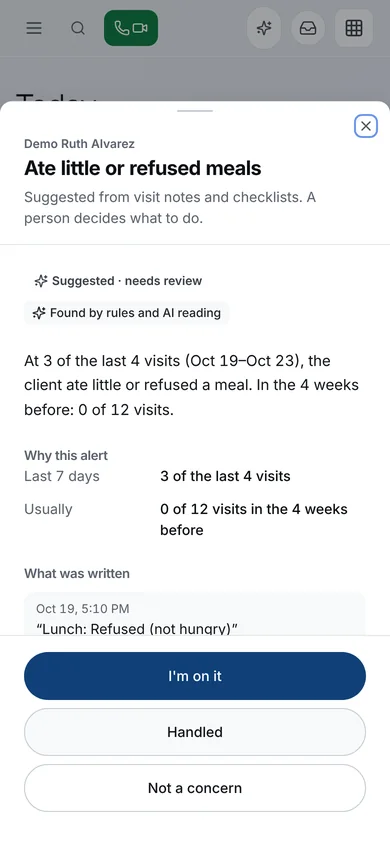
Screenshot from the app, demo data.
Honest by design
A heads-up for your nurse, never a diagnosis
A person reviews every alert
Nothing goes to a family, a case manager or a doctor on its own. Your nurse or coordinator decides.
Never a diagnosis
An alert says what was recorded and how often. It never names a condition or a cause.
AI, run privately
AI reading of notes runs privately in our own secure cloud under a HIPAA business associate agreement. Names, phone numbers and ID numbers are taken out of notes before they are read.
Your choice
AI reading is optional for each agency. The rule-based checks always run, with or without it.
Who uses it
Each person sees their part
Caregivers
Write visit notes and tick off care tasks as they already do. They don’t see the alerts.
Nurses
Get a notice when an alert needs follow-up today or is urgent, read the evidence, and decide: a call, a visit or a care plan change.
Coordinators
See alerts for the clients in their states, and call the family or find cover for a missed visit.
Admins
Decide whether AI reading of notes is on for the agency, and see every alert and review in the audit log.
The rule it helps you meet
Share only what’s needed, and keep a record
Each alert is shown only to the staff who cover that client. The case manager draft carries only what was observed, when, and what your agency is doing, for a person to check before it is sent. Every alert and every review is written to the audit log.
- HIPAA Privacy Rule, minimum necessary (45 CFR 164.502(b))
- HIPAA Security Rule, audit controls (45 CFR 164.312(b))
Compliance Pro is software. Your agency stays responsible for meeting the rules, and your state’s own rules apply.
Everything it does
Care alerts, in detail
- Watches every visit for a change from each client’s own usual.
- Eating less, refused medication, care tasks refused or not done, falls, confusion, mood, skin, sleep and missed visits.
- Optional AI reads caregivers’ notes for changes in their own words, run privately under a HIPAA business associate agreement.
- Every alert shows the evidence: which visits, when, and the caregiver’s exact words.
- A nurse or coordinator reviews every alert and decides what happens next, with a draft update for the case manager.
- An alert says what was recorded and how often. It is a heads-up for a person to review, never a diagnosis.
Questions
Does it diagnose anything?
No. An alert describes what caregivers recorded and how often, compared with the client’s own usual. It never names a condition. A nurse decides what it means.
Is the AI required?
No. AI reading of notes is optional for each agency. The rule-based checks run either way.
Where does the AI run?
Privately in our own secure cloud, under a HIPAA business associate agreement. Notes are stripped of names, phone numbers, emails and ID numbers before they are read, and the AI only reads notes for clients at your agency.
Will it flood us with alerts?
Each client is compared with their own usual, so a long-standing habit doesn’t alert. Sensitivity can be set to low, normal or high for your agency, and dismissing an alert keeps that kind quiet for the client for two weeks unless it becomes urgent.
Does it send anything to families or case managers?
No. It can write a draft update for the case manager. Someone at your agency checks it and sends it themselves.
Who sees the alerts?
Nurses, nurse supervisors, coordinators and admins, each for the clients they cover. Caregivers don’t.