
Features
Compliance Pro Meet: free video and voice calls
Meetby Compliance Pro
Compliance Pro Meet: free video and voice calls for your team, inside the app, included at no charge. Schedule a meeting and invite anyone by email, even people without an account.
Who uses it
Staff, Coordinators, People outside the app
The problem it solves
Talking about care shouldn’t mean a personal phone or a free video app.
A coordinator calls a caregiver from her own cell. A care conference with the family and the case manager runs on a free video app nobody checked. Afterwards there’s no note of who was on the call, and nothing on the client’s file to say it happened.
- Calls inside the app your team already uses
- People outside the app join from an email link
- Not recorded unless your agency turns recording on
How it works
From a message to a meeting
Call from where you already are
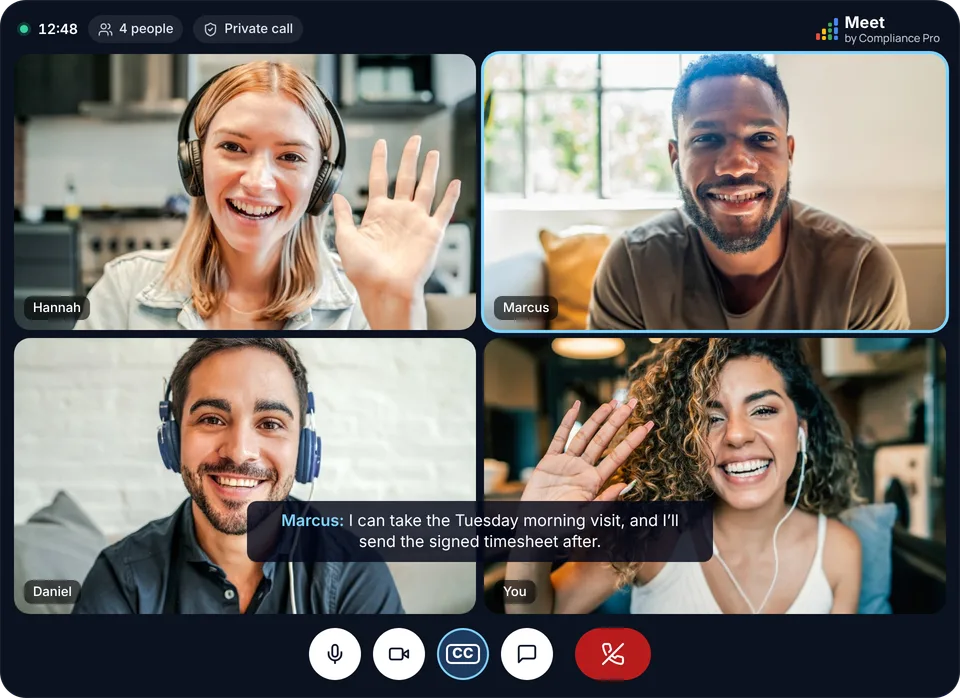
Start a video or voice call with a staff member from their profile, or a quick call from a message conversation. It rings on their computer or phone.
Schedule a meeting and invite anyone
Pick a time and add people. Staff get it in the app. People outside the app, like a family member or a case manager, get an email with a link. They join with no account and wait in the waiting room until you let them in.
Talk with live captions
Turn on captions and everyone sees the words as they’re said. Live captions are shown during the call and not saved unless your agency chooses to keep transcripts.
Tag the call to the right file
Tag a call to a client’s or a caregiver’s file, so it shows on their record with who was on it and when.
Private by design
Calls that stay between the people on them
Recording is your choice
Not recorded unless your agency turns recording on, and everyone in the call is told. Live captions are shown during the call and not saved unless your agency chooses to keep transcripts.
Guests wait to be let in
People outside the app join from their own link and wait in a waiting room until someone on your team lets them in.
Built for HIPAA
Calls run on our secure cloud, covered by our Business Associate Agreement at no extra charge.
Who uses it
Each person sees their part
Staff
Call a coworker in one tap, or start a quick call from a message.
Coordinators
Schedule care conferences, let guests in from the waiting room, and tag each call to the right file.
People outside the app
Join from the email link, with no account and nothing to install.
The rule it helps you meet
Protect health information when it’s spoken, too
Care talk often includes health information. Calls inside the app are encrypted on the way, guests are let in one by one, and nothing is recorded unless your agency turns recording on and tells everyone in the call.
- HIPAA Security Rule, transmission security (45 CFR 164.312(e))
- HIPAA Privacy Rule, business associate contracts (45 CFR 164.504(e))
Compliance Pro is software. Your agency stays responsible for meeting the rules, and your state’s own rules apply.
Everything it does
Compliance Pro Meet: free video and voice calls, in detail
- Video and voice calls between your staff, inside Compliance Pro, on a computer or the phone app.
- Schedule a meeting and invite people outside the app by email. They join from the link with no account, and wait in a waiting room until you let them in.
- Live captions are shown during the call and not saved unless your agency chooses to keep transcripts.
- Tag a call to a client’s or a caregiver’s file, so it shows on their record.
- Start a quick call from a message conversation.
- Not recorded unless your agency turns recording on, and everyone in the call is told. Built for HIPAA and covered by our Business Associate Agreement.
Questions
Do people outside the app need an account?
No. They get an email with a link, join from it, and wait in the waiting room until someone lets them in.
Are calls recorded?
Not recorded unless your agency turns recording on, and everyone in the call is told. Live captions are shown during the call and not saved unless your agency chooses to keep transcripts.
Does it work on the phone app?
Yes. Staff can take and make calls on a computer or in the phone app.
Can we keep a note that a call happened?
Yes. Tag the call to a client’s or a caregiver’s file, and it shows on their record.