
Features
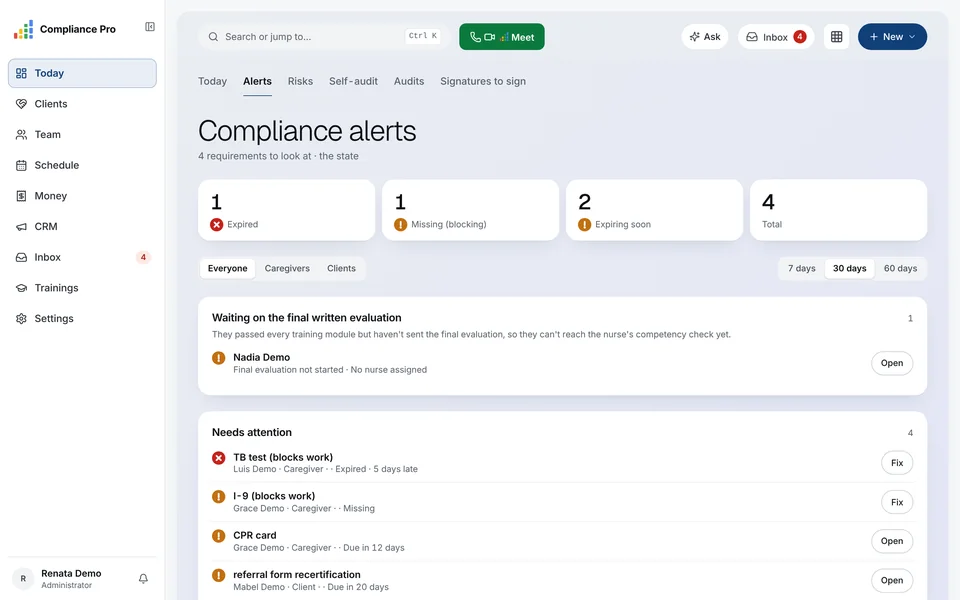
Alerts that run themselves
Pick the alerts you want, who gets each one and how. Your AI assistant sends them, so nobody has to remember to check.
Who uses it
Coordinators, Nurses, Owners
The problem it solves
Problems are found when someone remembers to look.
A missed clock-in is noticed when the family calls. A CPR card expires the week of the review. An authorization runs out and the claims stop. A visit that looks wrong is found months later in an audit. The information was in the app; nobody was told.
- Pick the alerts you want
- Choose who gets each one, and how
- Your AI assistant sends them
How it works
Choose once. The alerts take it from there.
Pick your alerts
Turn on the alerts you want from one list: missed clock-ins and clock-outs, visits to check, expiring trainings and licenses, eligibility and authorizations, care alerts, open shifts, timesheets, notes and new leads.
Choose who and how
For each alert, choose who gets it, such as the coordinator, the nurse or the owner, and how: in the app, a phone notification, email or text.
Check the visits that look wrong
“Check this visit” flags overlapping visits, a clock-in far from the client’s address, travel that isn’t possible in the time, and one phone used by several workers. A person looks and decides.
Your assistant sends them
Your AI assistant sends each alert to the right people, the way you chose, so nobody has to remember to check.
Who uses it
Each person sees their part
Coordinators
Hear about missed clock-ins, open shifts and visits to check, right when they happen.
Nurses
Get care alerts and care plans coming due.
Owners
Get the alerts that matter to you, like authorizations ending, and nothing else.
The rule it helps you meet
Verified visits and current files
Medicaid expects each visit to be verified, and reviewers expect trainings, licenses and checks to be current. Alerts tell the right person in time to fix it.
Compliance Pro is software. Your agency stays responsible for meeting the rules, and your state’s own rules apply.
Everything it does
Alerts that run themselves, in detail
- Missed clock-ins and clock-outs.
- “Check this visit”: overlapping visits, a clock-in far from the client’s address, travel that isn’t possible in the time, and one phone used by several workers.
- Trainings, licenses, background checks and care plans before they expire.
- Medicaid eligibility changes and authorizations that are ending.
- Care alerts about a client.
- From the AI scheduler: open shifts and gaps in coverage.
- Timesheets and visit notes that are missing or waiting, and new leads.
- For each alert, choose who gets it and how: in the app, a phone notification, email or text.
Questions
Does “Check this visit” mean fraud?
No. It means a visit looks unusual and a person should look. Your team reviews it and decides.
Can different people get different alerts?
Yes. For each alert you choose who gets it and how: in the app, a phone notification, email or text.
Do texts include client health details?
No. Texts say what needs attention and link to the app.