
Features
Agency branding
Your agency’s name, logo and colours, where your people see them.
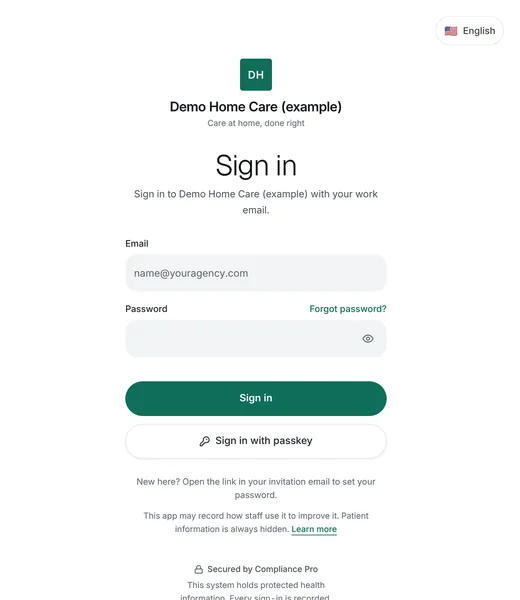
Screenshot from the app, demo data.
Who uses it
Admins, Clients and families, Staff
The problem it solves
Your staff and clients should see your agency, not ours.
Signing links, PDFs and emails that carry your name and logo are trusted and opened.
How it works
Agency branding, step by step
Screenshot from the app, demo data.
Where people see it
Your logo shows on the sign-in page, public signing links, client PDFs and emails. Inside the app everyone sees Compliance Pro.
Every email comes from your agency
Reminders, signing requests, weekly digests and alerts carry your logo at the top and your agency’s name at the bottom, and arrive as “Your Agency via Compliance Pro”. Replies go to your own inbox. Verify your own sending domain and they come from your address, such as care@youragency.com. Emails carry a link, never client details.
Signed copies filed for you
If you connect your Google Drive, completed signed PDFs are filed into your agency’s folders.
Screens from the Compliance Pro app, with demo data. Every name is made up.
Who uses it
Each person sees their part
Admins
Set the logo and colours once.
Clients and families
See your agency’s name on links, PDFs and emails.
Staff
Get reminders and alerts from your agency, not from a software company.
Everything it does
Agency branding, in detail
- Your logo and colours on the sign-in page, signing links and PDFs.
- Every email carries your logo and name and comes “via” your agency, or from your own address.
- Completed signed PDFs filed into your Google Drive folders, if you connect it.
Questions
Do caregivers see our logo in the app?
Your logo shows on the sign-in page, signing links, PDFs and emails. Inside the app everyone sees Compliance Pro.
Whose name is on the emails people get?
Yours. Each email shows your logo and your agency’s name, and the sender reads “Your Agency via Compliance Pro”. Replies go to the reply-to inbox you confirm.
Can emails come from our own address?
Yes. Verify your sending domain once in settings, and every email goes out from your own address, such as care@youragency.com.
Do emails include client information?
No. Emails carry a short note and a link. Details stay behind your sign-in.